
How to change your password
Changing your password regularly is a simple way to keep your account secure. In junbi, you can easily update your credentials from your personal settings menu. If you are locked out, you can also reset a forgotten password directly from the login screen.
How to change your password inside the platform
Follow these specific steps to update your credentials if you are already logged in.
- Click on the menu icon (3 dots) located in the top right corner of the junbi interface.
-
Select the Personal settings menu item.
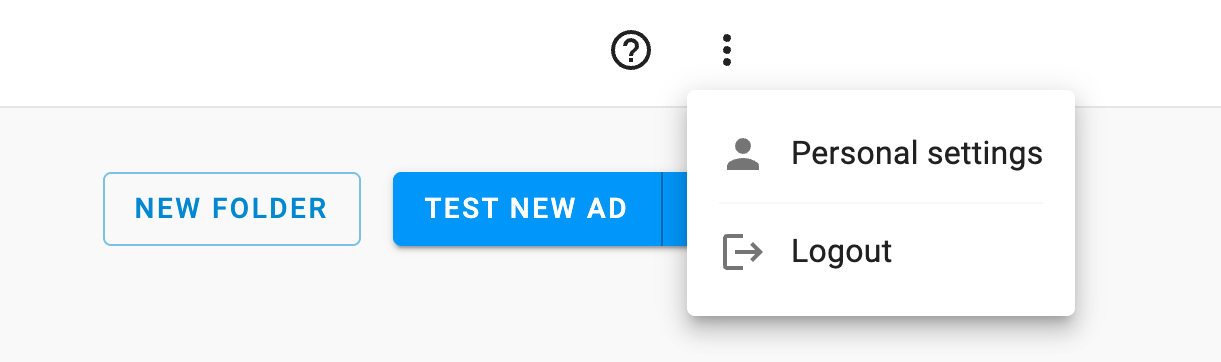
- Click on the Manage password option.
- Enter your current password in the required field.
- Enter your new password and confirm the changes.
How to reset your password if you forgot it
If you cannot remember your current password, you can trigger a secure recovery link using one of the two methods below.
While logged in
- Navigate to the Manage password screen using the steps outlined in the section above.
- Click the Click here to reset your password link located below the change password form.
- Open your email inbox and look for the recovery message. Click the secure link inside the email to establish your new password.
From the login screen (if locked out)
- Navigate to the main junbi login screen.
- Click the Forgot password? link located near the sign-in fields.
- Enter the email address associated with your junbi account.
- Open your email inbox and click the secure link inside the recovery email to set up your new credentials.
💡 Pro Tip
Check your spam folder: If you request a password reset and do not see the email within a few minutes, be sure to check your spam or junk folder. The reset link is time-sensitive to ensure your security.